WARNING: This section is intended for advanced users and "Super users" of PRIM Logix.
The configuration items presented in this section may indeed have an impact on your operations.
If in doubt, consult your system administrator.
Please note that only users in the appropriate security groups can access the software configuration windows.
Relation Type (CFG045)
Relation types are used to link two contacts in the system, with a reciprocal logic. The logic and description of the relationship between two contacts depends on the "Parent-Child" relation type.
In the database, a relationship is always represented by 2 records that define the relationship for the "parent" contact and the "child" contact.
Thus, there are 3 properties defining the different types of relation:
•Contact: Can be used in any type of contact record (candidate, client, division, employee, etc.), in the Relations tab of the relevant record.
•Service receiver: Visible in the client's Service receiver tab. This is usually another client, who receives the service but is not the one making the request. Particularly useful in a homecare settings, for example.
•Partner: Visible in the client's Partners tab. Typically, two partners have a business relationship, for example a head office and its affiliated centers. A partner can, for example, set rates or pay invoices for another partner, provided that the properties of each partner are adequately defined in their respective master records. .
In each contact record, the relationship is qualified differently, according to a reciprocal "parent-child" logic. Thus, each relationship must be linked to an inverse type to ensure this bidirectional logic. The parent is always the main entity (the record consulted), and the child the relationship added to it.
For example:
•The client ABC Company linked to Maryse. In the Company ABC client file, Maryse is an Employee relationship.
•Conversely, Maryse is linked to Company ABC. In her contact file, under relationship, we find Company ABC, an Employer relationship.
In the relationship types window, we define all the types of relationship that can exist in the system, specifying the associated properties.
Overview of the window
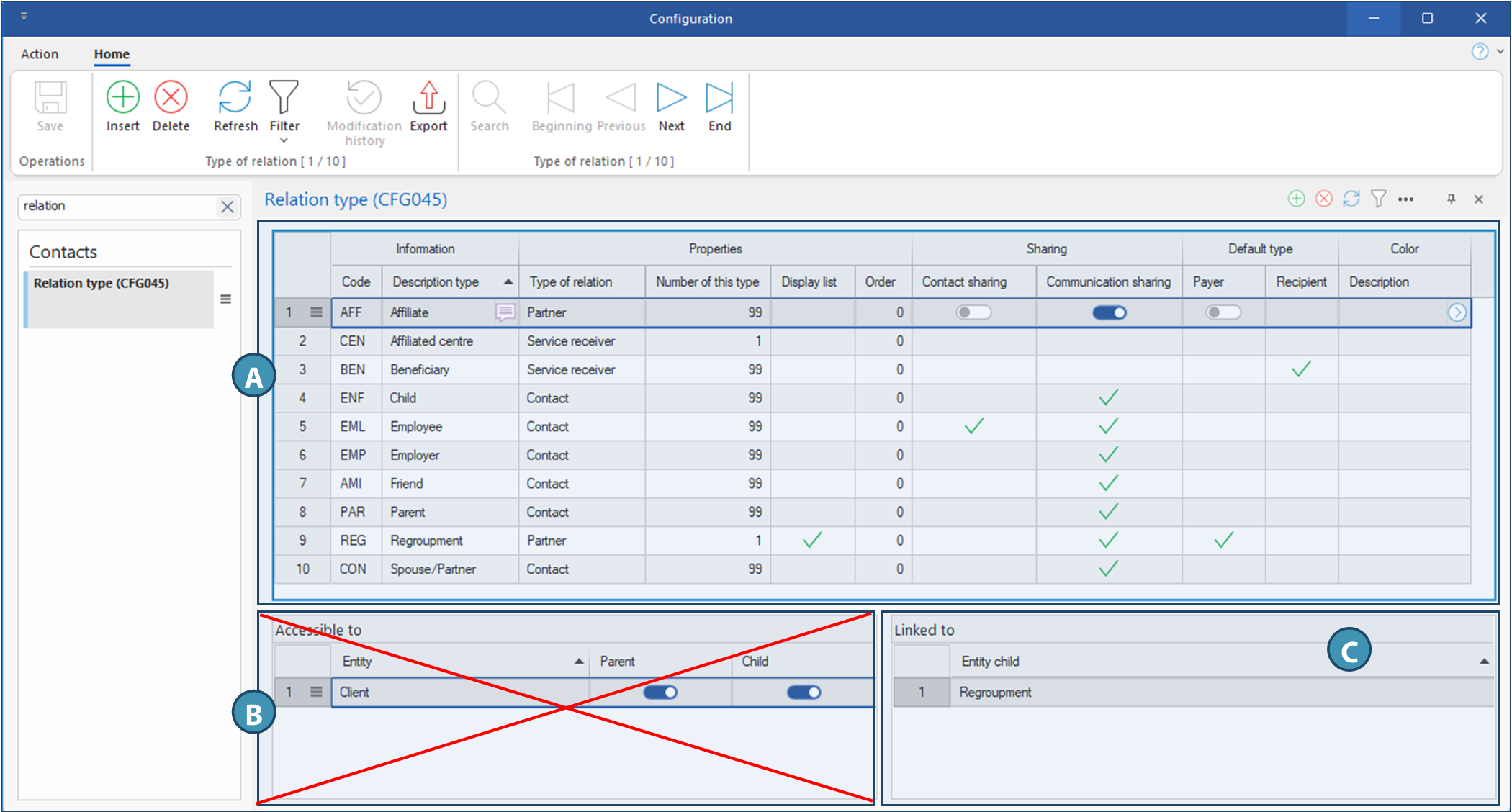
The window is divided into three sections:
A.Table listing all relation types and their properties
B.Accessible to: This section is no longer used and will be removed later.
C.Linked to : indicates the reciprocal entity for this relation type.
A. Properties of different relation types
The following is an explanation of the columns in this section and their corresponding properties:
Section Information
•Code: 3-character identifier
•Description : Visible, multilingual name. This is displayed in the Relationship column, to the right of the contact name.
Section Properties
•Relationship type: Property defining the type of relationship: Contact, Service receiver or Partner.
▪Contact: Can be used in any type of contact record (candidate, client, division, employee, etc.), in the Relations tab of the relevant record.
▪Service receiver: Visible in the client's Service receivers tab. This is usually another client, who receives the service but is not the one making the request.
▪Partner: Visible in the client's Partners tab. Typically, two partners have a business relationship, for example a head office and its affiliated centers. A partner can, for example, set rates or pay invoices for another partner, provided that the properties of each partner are adequately defined in their respective master records.
•Number of this type: Maximum number of occurrences in a file. For example, only one regroupment can be added to a client's file, but several clients can be affiliated to a regroupment.
•Display list: Allows the type to be displayed in dynamic views, provided that the number of this type is 1. For example, in the Shift Management window, we might want to see who is the regroupment of the requesting client in a separate column. If the property is enabled, the column can be added to the list view where it is relevant.
•Order: Determines the display order in the relevant folder.
Section Sharing
•Contact sharing: To avoid having to repeat information, it is possible to share relationships between several entities. For example, Nathalie is an employee at the head office of a company with 5 branches, and is responsible for accounting at all 5 branches. Enabling sharing on this type of contact will enable Nathalie's file to be shared between branches. To do this, this column must be activated on the relevant relationship type. For further details, see the page on configuring relationship sharing.
•Communication sharing: For shared contacts, determines whether communications are also shared, and whether they will appear in the communication history of all linked entities.
Section Default type
•Payer: For a partner type contact, indicates that this is the type that will be used in the quick insertion procedure.
•Recipient: For a service receiver contact, indicates that this is the type that will be used in the quick insertion procedure.
Section Color
•Description: In this column, the button is used to select a color scheme to be applied to the description text of this relationship type.
B. Accessible to
This section is no longer used and will be removed shortly.
C. Linked to
Each relationship type must be linked to an inverse type to ensure bidirectional logic. This section simply displays the inverse entity of the type selected in section A. For example, for an Employee relationship, the corresponding inverse type is Employer. Here are some examples of logical pairs:
•Employee ↔ Employer
•Parent ↔ Child
•Regroupment ↔ Affiliate
•Spouse/Partner ↔ Spouse/Partner