WARNING: This section is intended for advanced users and "Super users" of PRIM Logix.
The configuration items presented in this section may indeed have an impact on your operations.
If in doubt, consult your system administrator.
Please note that only users in the appropriate security groups can access the software configuration windows.
Transfer Codes (CFG007)
This pane allows you to map the various codes and items used in PRIM to those used in the external systems to which you wish to push accounting data. The types of data that can be transferred include items related to invoices, gross payroll, and client incoming payments. In PRIM, this data is subdivided into six types of export codes for which mappings must be established with external systems to enable accounting transfers:
•Invoice Type: Corresponds to hours worked and billed, according to the various Billing Types defined in PRIM, which can be associated with one or more functions. This data will be transferred in “Invoice” batches.
•Invoice Code: Any item invoiced using an invoice code, as configured in the Payroll and Invoicing Codes pane (CFG025). These will be transferred in “Invoice” batches.
•Salary Type: Corresponds to the hours worked and paid to candidates, according to the various Pay Types defined in PRIM. These will be transferred to “Payroll” batches
•Pay Code: Any item paid to the candidate using a pay code (for example, a bonus or an adjustment to hours), as configured in the Pay and Billing Codes pane (CFG025). These will be transferred to “Payroll” batches.
•Payment Type: These are payments received (payments received from clients). These will be transferred to “Receipts” batches.
•Tax Type: These are taxes added to invoices as defined in the Sales Tax Maintenance window (CFG048). These codes are typically added and transferred along with the invoices.
Every item that exists in PRIM must be associated with the corresponding revenue or income code in the system to which it is transferred. For example, if a payl code and a salary type are both associated with the same earnings code, even though it is the same code in your payroll system, there will be two lines in the table to indicate what each PRIM code corresponds to in your payroll system. However, a single PRIM code can group together multiple items (for example, salary type data is used for all PRIM functions), which must be selected for the corresponding row.
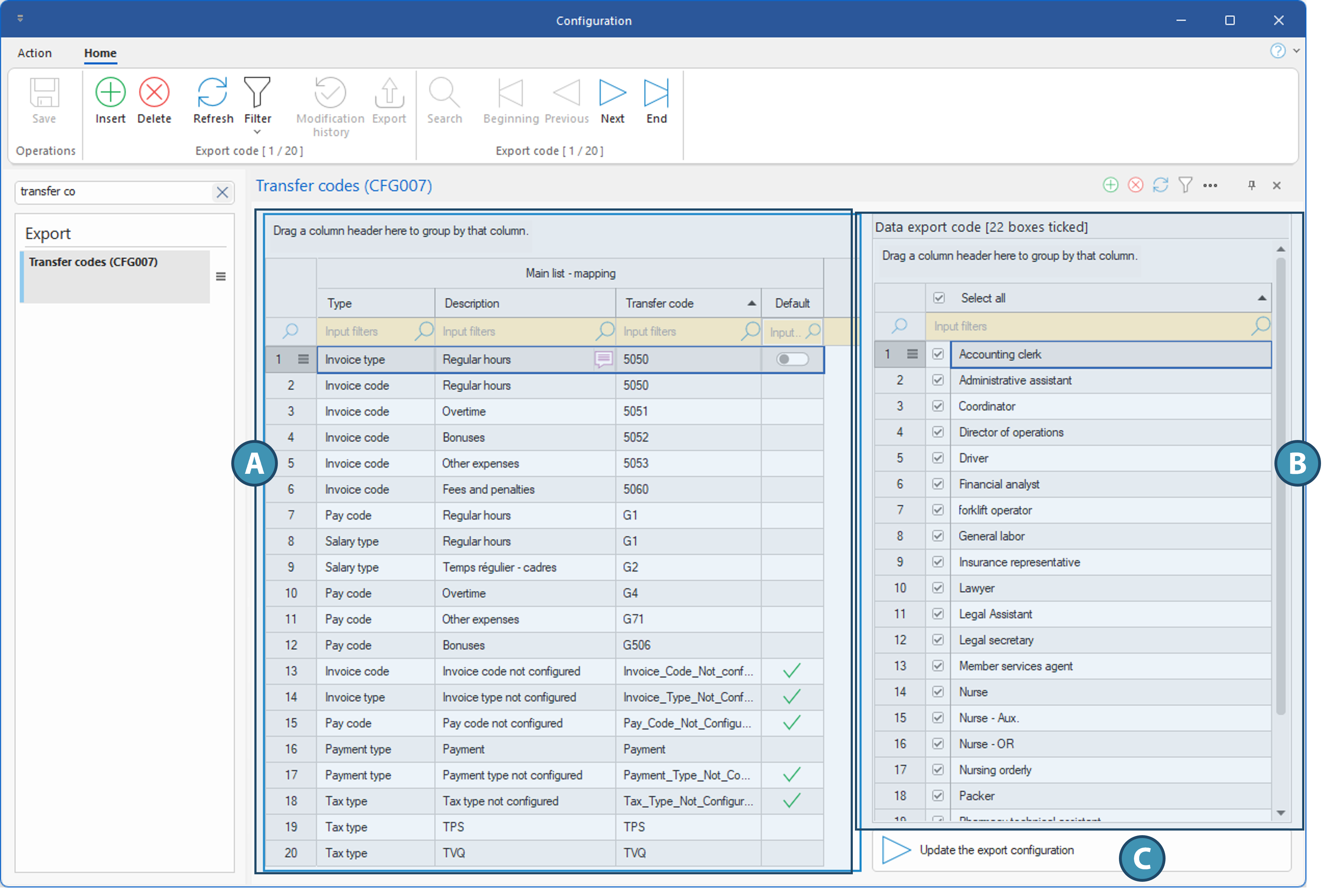
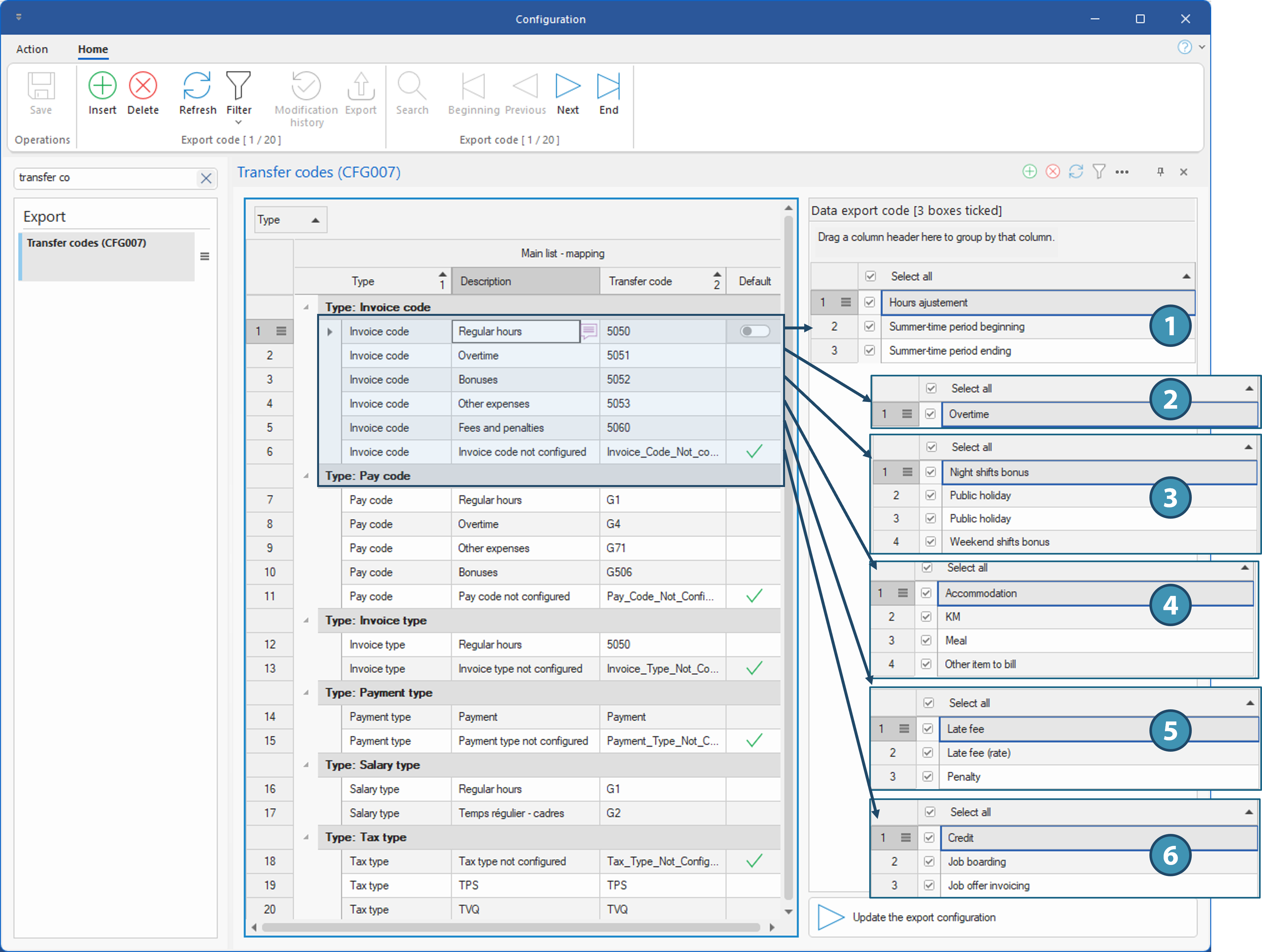
Below is an overview of the window, along with examples of how to map the codes.
Overview of the Window
Main List - Mapping (A)
This table is used to map the various types of data and PRIM codes to codes used in systems to which this data is exported
Here is an overview and explanation of the columns in this section.
•Type: This refers to the type of data to be exported (Invoice Type, Invoice Code, Salary Type, Pay Code, Payment Type, Tax Type).
Each data type can be used more than once if the data of that type corresponds to different codes in the external system. For example, a payroll code may be associated with regular hours or overtime in the payroll system.
•Description: Allows you to enter a description of the transferred data, based on the definition of the system to which this data is transferred. For example: regular hours, overtime, bonus, expense, etc.
•Transfer Code: This is the code corresponding to this data in the external system to which it will be transferred.
•Default: This checkbox allows you to set a default transfer code for any new code created in PRIM for which no mapping has been established. It ensures that no new item created in PRIM will be overlooked during an accounting transfer, in the event that the mapping was overlooked when the new item was created. This checkbox can only be selected on a single row per data type.
The transfer code configured by default does not necessarily have to be a valid code in the external system. On the contrary, creating a code that does not exist in the system will cause the transfer to be rejected due to the error in that row. This will allow you to map the new item to the correct code in the external system, after which you can regenerate the export file.
Data Export Code (B)
List of data included for a specific data type. The list that appears depends on the row selected in Part A and corresponds to the data type. For example, for a transfer code corresponding to an invoice type, all existing invoice types in PRIM will appear in the list to allow them to be associated with the transfer code. If there are multiple rows for a specific data type, once an item is checked on a row to map it to a code in the external system, it can no longer be associated with other codes; the list will therefore be reduced for the next row corresponding to that data type.
Refresh Export Configuration (C)
It is essential to click this button every time a change is made to the transfer codes so that the corresponding tables are updated.