WARNING: This section is intended for advanced users and "Super users" of PRIM Logix.
The configuration items presented in this section may indeed have an impact on your operations.
If in doubt, consult your system administrator.
Please note that only users in the appropriate security groups can access the software configuration windows.
Send variables (CFG046)
Send variables allow you to prepare personalized text elements in advance, in email or SMS templates, or directly at the time of sending. They are used to automatically insert information from PRIM files, without having to enter it manually. This section lists the variables that can be used from the various PRIM entities (candidates, clients, shifts, employees, etc.).
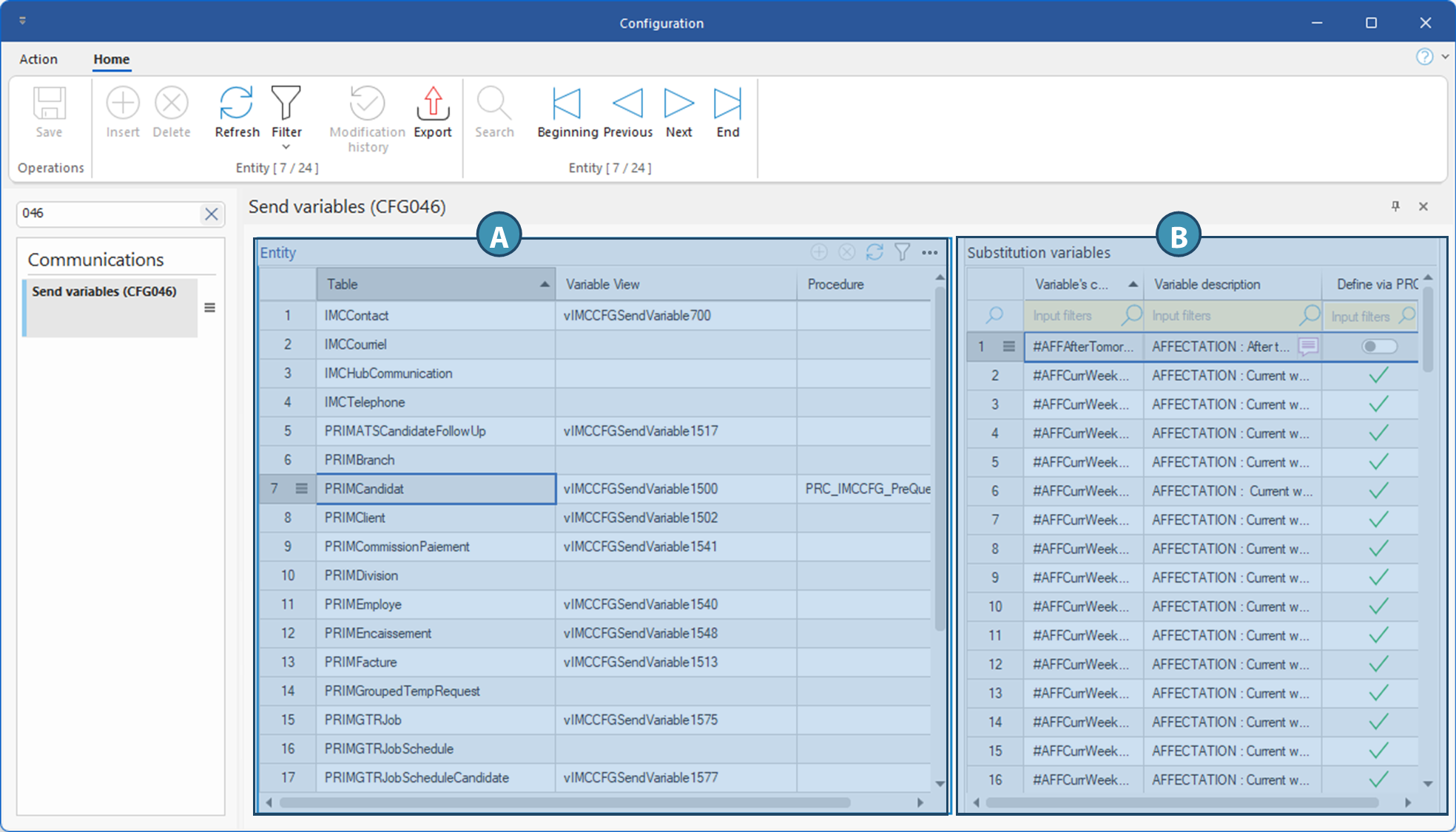
Overview of the window
A. Entity
This section lists all the entities or specific data sources in the database, the associated views and possibly the procedure used in certain cases. Here's a description of the various columns in this section and their contents
•Table: Exact name of the table used as a data source for the corresponding send variables. The table name often resembles the corresponding entity, e.g. PRIMCandidat for variables from a candidate file.
•Variable view: Name of the SQL view or intermediate object used to prepare data for use. This view groups together all filtered or transformed data, ready for use in the sending process. It can be the standard view, or one customized for the client. The view naming format determines whether the view is standard or customized:
oStandard views start with vIMCCFG: for example, vIMCCFGSendVariable1500, where the number 1500 also corresponds to the table number for candidates.
oCustom views start with the client's name(vCLIENT). Custom views will call everything from the standard view first, followed by custom additions.
•Procedure: In some cases, obtaining values requiring a complex calculation requires the prior execution of a procedure. When this is the case for certain variables in the selected table, the name of the procedure to be called is indicated in this column.
B. Replacement variables
This table displays the list of variables available for the selected table.
•Variable code: Represents the unique identifier or code of the field corresponding to the data retrieved by the variable. This code is often used in configurations or automation rules.
•Variable description: Descriptive, translatable text, enabling the user to understand precisely the content, context of use and meaning of the variable.
•Define via PRC: This column only appears if a procedure is indicated in the Procedure column of the Entity table (A). The switch is activated (check mark OR switch to the right if the line is selected) if the procedure must be executed to obtain the data concerned.