WARNING: This section is intended for advanced users and "Super users" of PRIM Logix.
The configuration items presented in this section may indeed have an impact on your operations.
If in doubt, consult your system administrator.
Please note that only users in the appropriate security groups can access the software configuration windows.
Countdown (CFG033)
This pane allows you to configure the default time limits for filling received requests, based on the time remaining before the shift begins.
The configured deadline determines how much time the agency has to assign a candidate to the shift. A corresponding countdown timer can be displayed in the Shift (PRIM014) and Shift Management (PRIM007) windows , as well as in the Operations tab of the Client window.
The values configured in this window serve as defaults. However, they can be customized for each client.
Window Overview
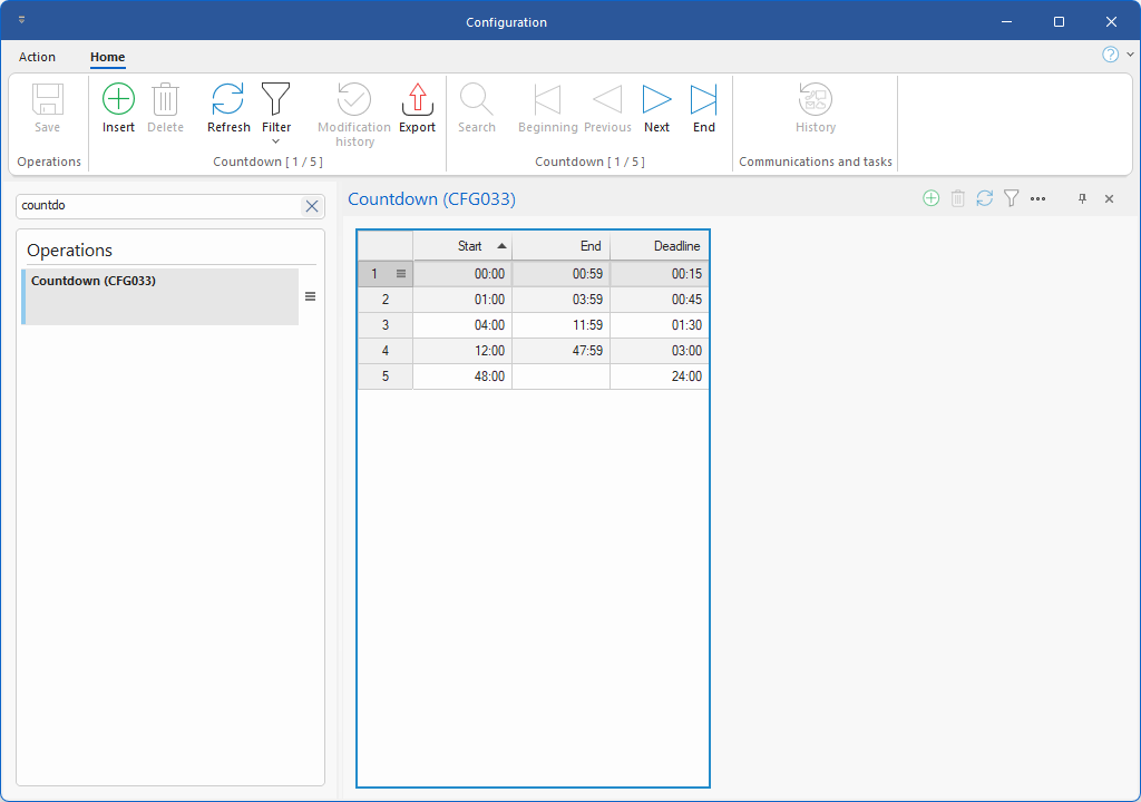
The table displays the various time periods remaining before the start of a shift, as well as the time allowed to fill the request.
The configuration shown below is provided for illustrative purposes only and does not correspond to the default configuration, which includes a single countdown that begins upon receipt of the request.
The countdowns are determined based on the time remaining between the receipt of the request and the start of the shift.
Here is an explanation of the different columns in the table:
•Start: Indicates the start of the remaining time period between the receipt of the request and the start of the shift.
•End: Indicates the end of this time period. When this value is not specified, the period has no upper limit.
•Deadline: Indicates the time allotted to fulfill the request, according to the agency’s internal procedures or the agreement with the client.
Examples
Here is an explanation of each of the rows shown below:
1.Request received less than one hour before the start of the shift: This line applies when the shift is scheduled to begin between 0 and 59 minutes after the request is received (Start = 00:00, End = 00:59). The allocated time is 15 minutes.
2.Request received between 1 hour and 3 hours 59 minutes before the start of the shift: this rule applies when the shift is scheduled to begin between 1 hour and 3 hours and 59 minutes after the request is received (Start = 01:00, End = 03:59). The allocated time is 45 minutes.
3.Request received between 4 hours. and 11 hours and 59 minutes before the start of the shift: This row applies when the shift is scheduled to begin between 4 hours and 11 hours and 59 minutes after the request is received (Start = 04:00, End = 11:59). The allocated time is 1 hour and 30 minutes.
4.Request received between 12 hours and 47:59 before the start of the shift: This rule applies when the shift is scheduled to begin between 12 hours and 47 hours plus 59 minutes after the request is received (Start = 12:00, End= 47:59). The allocated time is 3 hours.
5.Request received more than 48 hours before the start of the shift: This rule applies when the shift is scheduled to begin more than 48 hours after the request is received (Start= 48:00, End= blank). The time allowed is 24 hours.