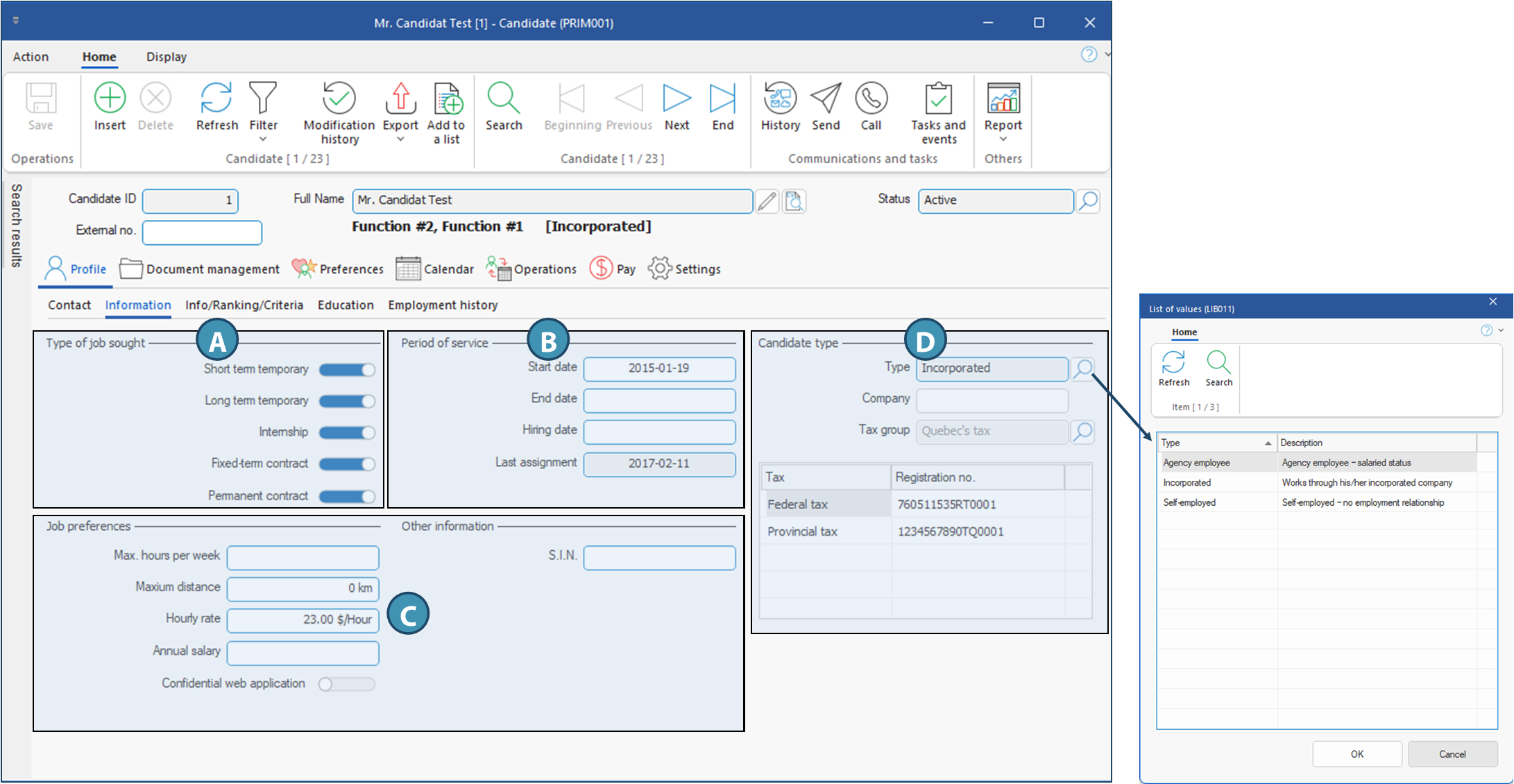
Tab - Information
The Information tab contains the information related to the hiring and the type of job the candidate is looking for.
Fields description
A. In section Type of job sought, you will find the various job types that can be offered by your agency. Activate the job types for your candidate to become available in the planner or ATS when his/her profile matches the job.
Short term temporary: This refers to punctual requests. Each requests is for a single shift, and the candidate is employed and paid by your agency.
Long term temporary: This refers to grouped requests. These are for middle or long-term assignments for the same client, but for which the candidate is still employed and paid by your agency.
Internship: If you activate this job type, candidates can be offered jobs designed for learning. In this type of job, the candidate is hired and paid by the client.
Fixed-term contract: If you activate this job type, the candidate can receive contractual job offers. In this type of job, the candidate is hired and paid by the client.
Permanent job: If you activate this job type, the candidate can receive offers for permanent positions. In this type of job, the candidate is hired and paid by the client.
B. Section Period of service shows important dates relating to candidate's work in your agency, including:
Start date: Date field to be filled in manually. You can specify the employment start date for your candidate, i.e. the date of the first shift for your agency.
End date: Date field to be filled in manually. You can specify the date the date you close the file of a candidate who worked for you or have been hired through your agency.
Hiring date: Date field to be filled in manually. You can specify the official hiring date, i.e. the date the work agreement was signed.
Last assignment: Date field automatically populated. For candidates assigned to temporary requests, the field is updated over night based on work assignments in your system.
C. Sections Job preferences and Other information contains information relating to the candidate's work and working conditions as desired.
Max. hours per week : Maximum hours the candidate wants or is authorized to work in a week. This is for information purpose only, and displayed in the planner .
Maximum distance : This is the maximum distance the candidate is disposed to travel for an assignment. For information purposes only : this data is displayed in the planner.
Hourly rate: Hourly rate the candidate is asking for. For information purposes only : this data is displayed in the planner, but will have no effect on the request's rate if the candidate is assigned. For personalized rates that will have an impact when the candidate is assigned, please refer to the page Salary settings in candidate's file in Accounting section.
Annual salary : Annual salary the candidate wants. For information purposes only.
Confidential web application: Activate this option if the candidate wants to stay anonymous for the client when applying on the web without taking into consideration the privacy settings for your division and application statuses.
S.I.N. : Candidate's social insurance number. This information is essential for full integration with a payroll system. The information can be hidden to some security groups if needed.
D. The Candidate Type section allows you to specify whether the candidate is an employee of the agency, self-employed or has his/her own incorporated business. Note that for salaried candidates, only the Type field is displayed. The other fields are displayed according to the other options selected
Type: Allows you to select the candidate type(Employee, Self-employed or Incorporated, or any other candidate type defined in the Candidate Type pane (CFG059) of the configuration window.
Company: This field is only displayed for Self-employed or Incorporated candidates. It is used to indicate the name of the company under which the candidate works, if applicable, so that it appears on the payroll generated in the form of an invoice. This field is optional.
Tax group: This field is only displayed for self-employed or incorporated candidates. Allows you to select the appropriate tax group, if the candidate will be invoicing you with taxes.
Tax and Registration No.: This table and these fields are displayed only if a tax group is selected. Each line of the table corresponds to the taxes included in the selected tax group, and allows you to enter the candidate's registration number.